 GIF Crate
GIF Background Remover
Clear one color out of every frame. The file stays on your device.
Preview
Upload GIF
Tap or click to choose a GIF, or upload from a URL. You can also drop a file or paste.
Controls
A lacquer plate crosses a mint cloth
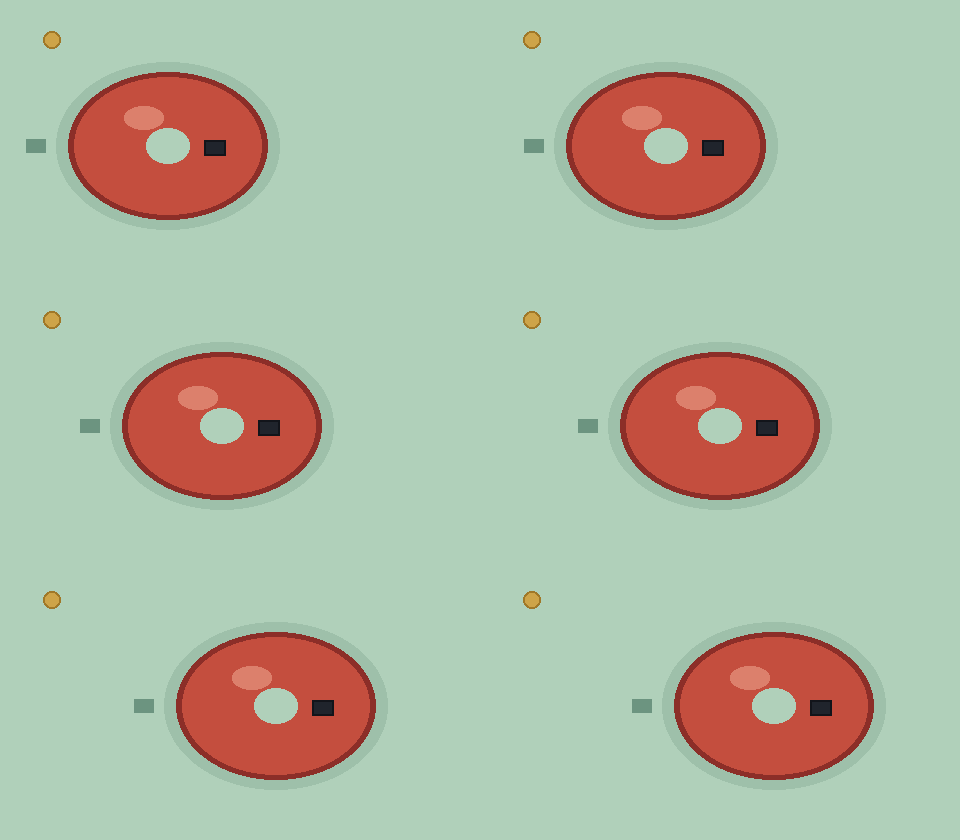
The wide loop is the GIF this page starts from. A coral lacquer plate slides across a mint cloth, from the left toward the right, over eight frames. A gold pin stays in the upper left. The middle of the plate is a hole filled with the same mint as the cloth, and a pale rim sits just outside the coral. A dark stitch rides further out, on the cloth. The picture is 480 by 280, and nothing in it is lettering. The first frame waits 12 hundredths of a second. Each of the six frames in the crossing waits 7. The last frame waits 16. This file is 18,072 bytes. In the tool, Auto reads the four corners of the first frame. Those corners are this mint.
Clearing mint opens the cloth and the hole in the plate
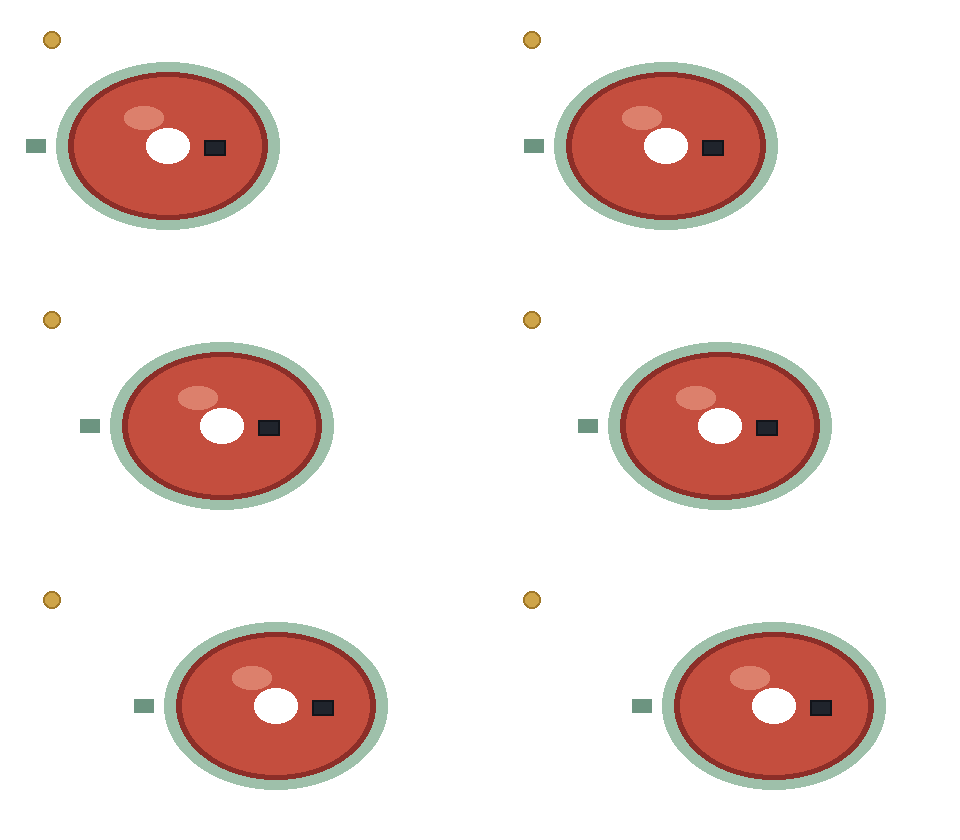
Everywhere clears that mint on every frame, the cloth and the hole together. The width and the height stay 480 by 280, and each wait stays on the frame it belonged to. This file is 18,072 bytes, the same count as the cloth, because the plate, the pin, the pale rim, and the stitch are still stored. The cleared pixels are one transparent index. The checker behind this picture is drawn by the page. It is not in the file. The pale rim stays. On red, green, and blue it sits 18, 16, and 16 away from the cloth, just under 29 steps, and the slider for this pass is 24.
From the edge, the hole in the plate stays filled
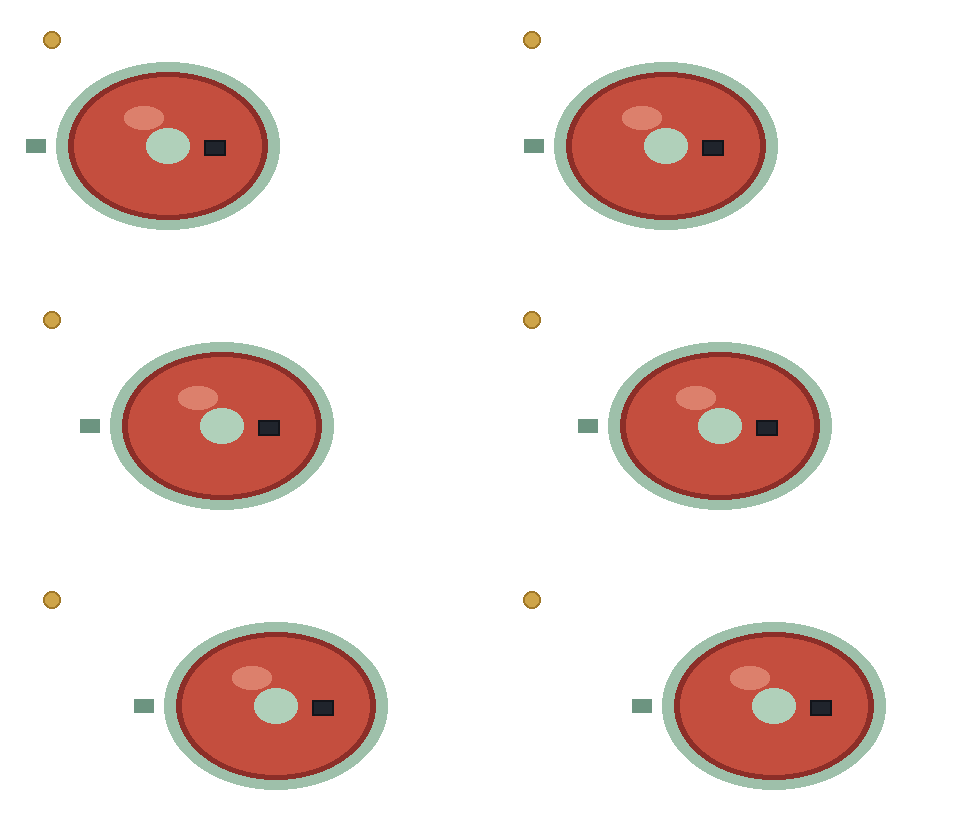
From the edge clears mint that touches the border of the frame. The hole is mint too, and the coral stands between that hole and the border, so the hole stays filled while the cloth opens. The picture is still 480 by 280. This file is 18,439 bytes. The gold pin, the pale rim, and the dark stitch are the pixels from the cloth file. Apply writes the preview you are looking at into the GIF you have open, then puts the slider back to 24. Download saves a separate copy and leaves that open GIF as it was.
Forty steps take the pale rim and leave the dark stitch
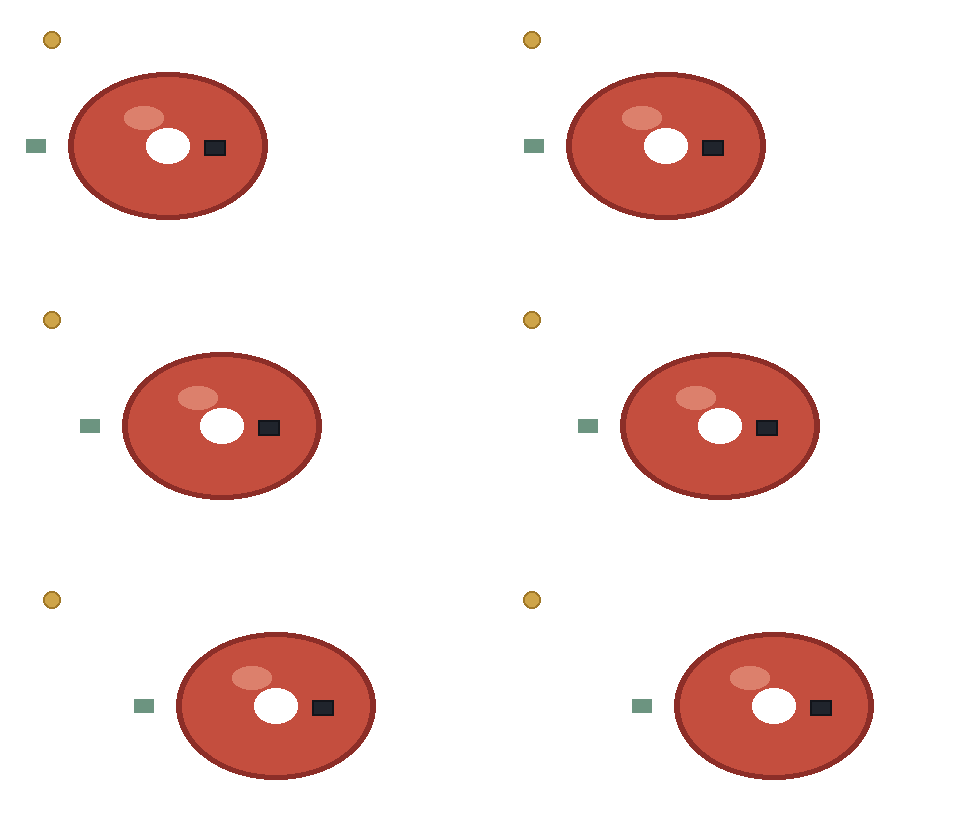
This pass sets the slider to 40. The pale rim, just under 29 steps from the cloth, clears with the mint. The dark stitch is 68, 60, and 58 away on red, green, and blue, about 108 steps, past the slider's stop at 80, so the stitch stays beside the plate. The gold pin stays. The picture is 480 by 280. This file is 14,657 bytes. It is smaller than the 18,072 bytes the page opened with, because those rim pixels are no longer stored as their own color. Each pixel is still either clear or solid.
A rectangle you want gone is GIF Cropper. A new pixel size is GIF Resizer. This page leaves both alone and clears one color.
A sticker starts as a drawing on one flat color
You want a sticker. The drawing should move, and the chat or the page behind it should show through. A drawing app usually exports that drawing on one flat field. The field is white, mint, or green. This page clears that one background color on every frame. The drawing stays. The width stays. The height stays. Each frame keeps the wait it already had.
The loop above is that job at 480 by 280. A coral plate slides across a mint cloth over eight frames. The cloth is the field. The plate is the sticker. Auto reads the four corners of the first frame, and on this file those corners are the mint. Everywhere clears the mint on the cloth and the mint inside the plate together. From the edge clears only the mint that touches the border, so the hole in the plate stays filled. A face works the same way. The white behind the head should go. The white in the eyes should stay, when that white does not touch the border. Use From the edge for the eyes. Use Everywhere when the same color is also a hole you want open: the counter of a letter, or the gap between an arm and a coat.
A pixel in a GIF is solid or clear. There is no half-clear pixel, so a soft shadow, a blur, and a fade into the old field do not become a feathered edge. They stay solid until the slider reaches them, then they vanish in one step. The pale rim on this plate is 18, 16, and 16 away from the mint on red, green, and blue, just under 29 steps. At 24 the rim stays. At 40 the rim clears with the cloth. The dark stitch is 68, 60, and 58 away, about 108 steps, past the slider stop at 80, so the stitch stays beside the plate at every stop. If your export anti-aliases the outline into the field, raise the slider until that fringe goes, and stop before a color that belongs to the drawing starts to open. Scrub the whole loop. A fringe that is quiet on the first frame can show up on the frame where the shape crosses a different part of the field.
The checker behind the cleared frames is drawn by the page. It is not in the file. Download writes one transparent index. Open the saved GIF on a light page and on a dark page. A rim that looked harmless on the checker can read as a halo on black, or as a bite taken out of the drawing on white. That binary edge is the sticker edge. It is the same edge the plate has.
After the field is gone, a mat of clear pixels is often left around the drawing. The mat is still width and height. A sticker wants the drawing, not a wide empty border. GIF Cropper takes one rectangle out of every frame and leaves the waits alone. Crop after the color is clear, so you can see where the drawing sits. Crop first only when the spare area is a different problem, a clock, a caption bar, or a watermark, and the field you mean to clear is already the color at the corners.
A green screen is the same path when the screen is close to one green. Sample that green. A shadow the screen threw onto the drawing is a second color, and the slider has to cover the spread between them. A green painted into the character leaves with the screen. A photograph of a person standing in a room is not this job. The room is many colors. Clearing the corner color punches a hole where that color happens to appear, and the rest of the room stays.
Apply writes the preview into the GIF you have open, then puts the slider back. Download saves a separate copy and leaves the open GIF as it was. The file name ends in -background. The GIF stays in the browser. A second pass, a higher slider or a switch from From the edge to Everywhere, belongs on the open file. You do not have to re-import the download to try the other range.
An emoji is that clear drawing fitted to a square
A custom emoji is that same clear drawing, asked to fit a small square and a small file. Discord custom emoji stay at or under 128 by 128 pixels, and the file stays under 256 KB. A Discord sticker is the larger square of the same idea: exactly 320 by 320, and at or under 512 KB. An animated sticker also has to stay within 5 seconds. Those are the slots. This page does not change width or height, and it does not drop frames to make a loop shorter. Clear the field here. Fit the square next.
GIF Resizer places one window on the picture you already have. Inside the picture the window crops. Past the picture it leaves a margin. Zoom resamples the size you save. The emoji square is 128 by 128. The sticker square is 320 by 320. A picture that is not square has to lose a side or gain a margin. Clear the flat field on this page first, so a margin added later can stay transparent instead of painting the old field back around the drawing. If you fit the square first, you resample the field and the fringe together, and the color you meant to clear spreads across more steps. Clear, then fit.
Twitch emotes are three squares from one drawing: 112, 56, and 28. The order is the same. Clear the flat field here so each size is the drawing, not the drawing sitting in a box of white. Those three widths are a resize. This page still only removes the one color. A wide picture, the way the plate is 480 by 280, does not become a square by clearing mint. Clearing mint leaves 480 by 280 with a transparent cloth.
Pixels and bytes are different limits. A flat drawing at 128 by 128 is often already under 256 KB, because long runs of one transparent index pack into a short file. A loop with many colors, or a long run of frames, can still sit over 256 KB after the square is right. GIF Compressor leaves the pixel size alone. Its slider searches for a file size, and 256 KB is one of the marks. Press that mark for the emoji. If the strongest pass is still over 256 KB, the square has to shrink again, or frames have to leave, in a tool that changes those. This page will not. A sticker that is already 320 by 320 and still over 512 KB takes the same second pass against the byte line. You read the size it writes and you decide.
Chat is a looser slot than an emoji. A free Discord account can attach a GIF up to 20 MB. A reaction you only drop in a channel can stay at the size you opened, once the field is clear. You do not have to squeeze it to 128 just because an emoji would. Use the square when the slot is an emoji or a sticker. Leave the pixels when the slot is a file attachment.
Look at the eyes and the counters after the square is fit. Resampling can blend the outline into the clear index and invent a new fringe, or it can close a one-pixel hole that From the edge had kept. If the square looks bitten, return to the cleared file and fit a slightly larger window before you zoom down. The waits survive both passes. A frame that waited 12 hundredths of a second still waits 12. Nothing on this page rewrites that wait.
A reaction you drop over another picture
Some loops are neither a sticker nor an emoji. They are a reaction you set on top of a post, a slide, or another picture: a small motion, a tick, a mark crossing the frame. The useful file is the motion with the field removed, so the picture underneath shows through. That works when the field was one color. A card on a sweep of one paper, an icon on a single fill, a screen recording of a flat window: those are the loops to open here. A person waving in a kitchen stays a person in a kitchen. Hair, a window, a lamp, and a wall are not one palette index.
Put the cleared file on a light ground and on a dark ground before you use it. The checker hides a halo that a real page will show. On this plate the pale rim is that halo. It sits just under 29 steps from the mint, and it is easy to miss while the slider is at 24. At 40 the rim is gone. The stitch, about 108 steps away, is still there, because the slider stops at 80. Your overlay has the same split. A near color is the fringe of the old field. A far color is the drawing. Walk the slider in small moves and watch one frame where the shape meets the field, then watch the frame where it meets the field again on the other side.
Timing belongs to the reaction, and this page does not rewrite it. On the plate, the first frame waits 12 hundredths of a second, each of the six frames in the crossing waits 7, and the last frame waits 16. Your file keeps the waits it had. A loop that feels rushed is a change to those waits, made after the field is clear, or before. The two edits do not share a pixel. One writes a transparent index. The other writes the delay bytes. Frame count stays as well. Eight frames stay eight frames. A long screen recording is still long after the field is gone. A slot that caps length will still refuse it. Cut the length in the editor that made the recording. There is no frame picker here.
The transparent index is one entry in the palette. A GIF holds at most 256 colors. Clearing the field reuses one of those entries. It does not add a 257th color. A drawing that already used every index can lose a rare color when that index is the one that becomes clear. On this plate the pin, the rim, and the stitch are the colors you would check. After your own pass, look at the small marks and confirm they are still the pixels you started with.
The usual order is the one the sticker and the emoji already followed. Clear the one field. Crop the spare mat when the motion sits in a corner of a large frame. Fit the square when the slot asks for one. Compress when a byte cap is still over. Stop when the checker, a light page, and a dark page all show the same drawing. The file you download stays on the device. Apply is only there so a second pass, a higher slider or the other range, can reuse the GIF you already opened.
Questions about clearing one color from a GIF
Does clearing a color change the pixel size?
No. This loop stays 480 by 280, and it stays eight frames. The frame that waited 12 hundredths of a second still waits 12, and the last frame still waits 16. What changes is which palette color is the transparent one. Width and height are the picture you already have open.
Why does a pale rim remain when the cloth is gone?
A GIF stores each pixel as clear or solid. The pale rim is 18, 16, and 16 away from the mint on red, green, and blue, just under 29 steps. At 24 those pixels stay solid, which is the rim you see around the plate. At 40 they clear. The slider stops at 80, so a color about 108 steps away, the dark stitch, stays at every stop.
What does From the edge keep that Everywhere clears?
Everywhere clears the mint in the cloth and the mint inside the plate. From the edge starts at the border and stops when it meets another color, so the hole stays mint. The plate on this page is what stands in the way. A mint patch that touches the border goes with the cloth.
How is this different from a resize, a crop, or a speed change?
GIF Resizer and GIF Cropper change the rectangle. GIF Speed Changer keeps the picture and rewrites how long each frame waits. Clearing a color leaves the rectangle and the waits, and writes one color as transparent. A download from this page ends in -background, and the GIF stays in the browser.
Related tools
- GIF Maker
Turn PNG, JPEG, or WebP pictures into one GIF in this browser.
- GIF Resizer
Crop or pad every frame with a window in this browser.
- GIF Cropper
Cut one rectangle out of every frame in this browser.
- GIF Compressor
Make the file smaller in this browser. The picture stays the same size.
- GIF Rotator
Turn or flip every frame in this browser.
- GIF Speed Changer
Play every frame faster or slower in this browser.
- GIF Reverser
Play the loop backwards in this browser.
GIF Background Remover
Clear one background color in this browser.